

Beschrijving
Deze plugin is niet getest met de laatste 3 grotere versies van WordPress. Mogelijk wordt het niet meer onderhouden of ondersteund. Ook kunnen er compatibiliteitsproblemen ontstaan wanneer het wordt gebruikt met recentere versies van WordPress.

Blog Post Filter
Beschrijving
Blog Post Filter is a plugin that allow the site administrator selects which categories should be shown on the site frontpage. Only posts that are in the selected categories would be shown on the site main loop.
Major features of Blog Post filter include:
- Simplicity: In contrast with similar plugin this plugin is very simple and easy to use.
- Efficiency: The plugin has a minimum processing overhead on the site.
- Multilingual: Supports Persian and English admin page translation.
Schermafbeeldingen
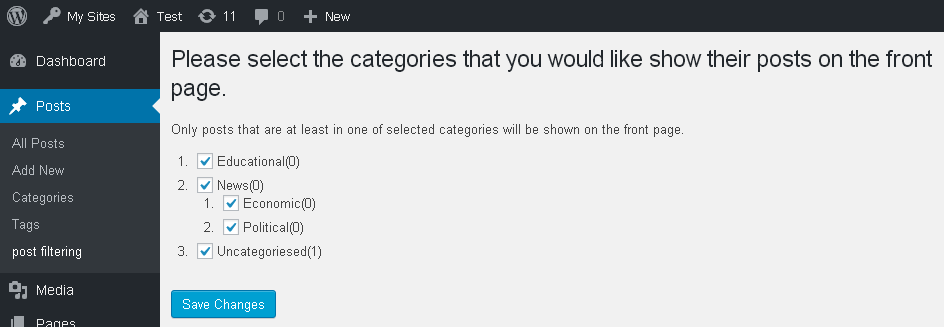
Preview of the Blog Post Filter’s admin page (v1.0.1). 
Preview of the Blog Post Filter’s admin page (v1.1.0). 
Persian translation of the plugin (v1.1.0).


Installatie
- Upload
sloth-category-filterdirectory to the/wp-content/plugins/directory - Activate the plugin through the ‘Plugins’ menu in WordPress
- Select the categories int the setting page in the posts section.
- You’re done!
FAQ
- Does a post would be shown if just some of it’s categories are selected.
Yes, every post that has at least one selected category in it’s categeory list would be shown on the front page.
- How can I report bugs or contribute to the plugin?
You can send an email to the ammar.shahraki@gmail.com.
Beoordelingen


Bijdragers & ontwikkelaars
“Blog Post Filter” is open source software. De volgende personen hebben bijgedragen aan deze plugin.
Bijdragers
Vertaal “Blog Post Filter” in je eigen taal.
Interesse in ontwikkeling?
Bekijk de code, haal de SVN repository op, of abonneer je op het ontwikkellog via RSS.
Changelog
1.1.0
- Added an option to filter sticky posts.
1.0.1
- Minor bug fix.
1.0.0
- Fist version.

