

Beschrijving

Block Accessibility Checks
Beschrijving
Block Accessibility Checks is a comprehensive WordPress plugin that proactively prevents accessibility issues in your content before they reach your audience. Designed for the Gutenberg block editor, it provides real-time validation with a three-tier system that ensures your blocks, post meta fields, and overall document structure meet WCAG (Web Content Accessibility Guidelines) requirements.
Unlike reactive accessibility tools that scan published content, this plugin catches problems during the editing process—giving immediate visual feedback and preventing publication of content with critical accessibility errors. Content creators get clear guidance on what needs fixing, while developers can extend the system with custom checks for blocks, meta fields, and editor-level validation.
Whether you’re a content creator ensuring your posts are accessible, a developer building accessible blocks, or an organization maintaining compliance standards, Block Accessibility Checks provides the tools you need to create inclusive content effortlessly.
Features for Content Creators & Editors:
- Real-time Visual Feedback – See accessibility issues instantly with color-coded borders (red for errors, yellow for warnings) around problematic blocks and detailed error messages in the block inspector panel
- Smart Publishing Control – Critical accessibility errors prevent publishing until resolved, while warnings allow publication with user awareness
- Comprehensive Block Coverage – Built-in validation for images, buttons, tables, headings, and galleries with clear guidance on how to fix issues
- Document-Wide Validation – Advanced heading hierarchy checking prevents skipped heading levels and ensures proper content structure across your entire post
- Title Validation – Ensures posts and pages have a title set for accessibility and SEO, validates in real-time as you type
- Intelligent URL Validation – Real TLD validation using the Public Suffix List ensures only legitimate domains are accepted in button links
- Configurable Settings – Control which checks are errors (prevent publishing), warnings (allow with notice), or disabled through an intuitive admin interface
- Grouped Error Display – All accessibility issues shown at once in organized groups, eliminating the “fix one, see another” frustration
- Works Everywhere – Validation runs in both the post editor and site editor (templates/template parts) with separate configurable settings
Features for Developers & Plugin Authors:
- Three-Tier Validation API – Register custom checks for block attributes, post meta fields, and editor-level validation using comprehensive hooks and filters
- JavaScript-Only Validation – All validation logic runs in JavaScript for real-time editor feedback without server round-trips
- Automatic Settings Integration – External plugins automatically get their own settings pages under the Block Checks menu
- External Plugin Support – Works seamlessly with custom blocks from third-party plugins and themes
- Extensive Hook System – 20+ action and filter hooks for complete customization of registration, validation, and display behavior
- Well-Documented API – Complete developer documentation with quick start guides and working code examples
How It Works:
The plugin provides immediate feedback as you edit content through a sophisticated three-tier validation system:
- Block Validation – Validates individual block attributes in real-time as you type and edit
- Meta Field Validation – Checks required post meta fields with automatic post locking when validation fails
- Editor-Level Validation – Validates document-wide concerns like heading hierarchy that span across multiple blocks
When accessibility issues are detected, they are highlighted with visual indicators (red for errors, yellow for warnings) and detailed messages explain how to fix the problems. Critical errors prevent publishing until resolved, while warnings allow publication with user acknowledgment.
Built-in Accessibility Checks:
- Button Blocks – Ensures buttons have descriptive text content and validates link destinations using real TLD validation (Public Suffix List)
- Image Blocks – Requires alt text (unless marked decorative), validates alt text length (warns if exceeding 125 characters), prevents caption duplication, and detects non-descriptive patterns like “image of” or “photo123”
- Table Blocks – Requires proper headers or captions for screen reader navigation
- Heading Blocks – Validates proper heading hierarchy across entire document (prevents skipped levels), ensures appropriate first heading level (H2 recommended, H1 allowed with warnings), and provides configurable heading level restrictions (H1, H5, H6 can be disabled)
- Gallery Blocks – Applies comprehensive image accessibility checks to all gallery items (alt text, length, patterns, caption duplication)
- Post & Page Title Validation – Ensures posts and pages have a title set for accessibility and SEO, validates in real-time as users type, prevents publishing content without a title, configurable independently for posts and pages
- Post Meta Fields – Validate required custom fields with real-time validation, automatic post locking for errors, and seamless integration with block validation system
Perfect For:
- Government websites requiring WCAG compliance
- Educational institutions with accessibility mandates
- Businesses committed to inclusive web content
- Developers building accessible WordPress themes and plugins
- Content teams who want accessibility guidance built into their workflow
Developer Resources:
Extend the plugin with custom accessibility checks using the comprehensive validation API. See the complete developer documentation for quick start guides, API reference, code examples, and a working example plugin.
Getting Involved
If you would like to get involved and contribute to the development of this plugin or view it’s source code you can find more information in the plugins GitHub repo.
Schermafbeeldingen
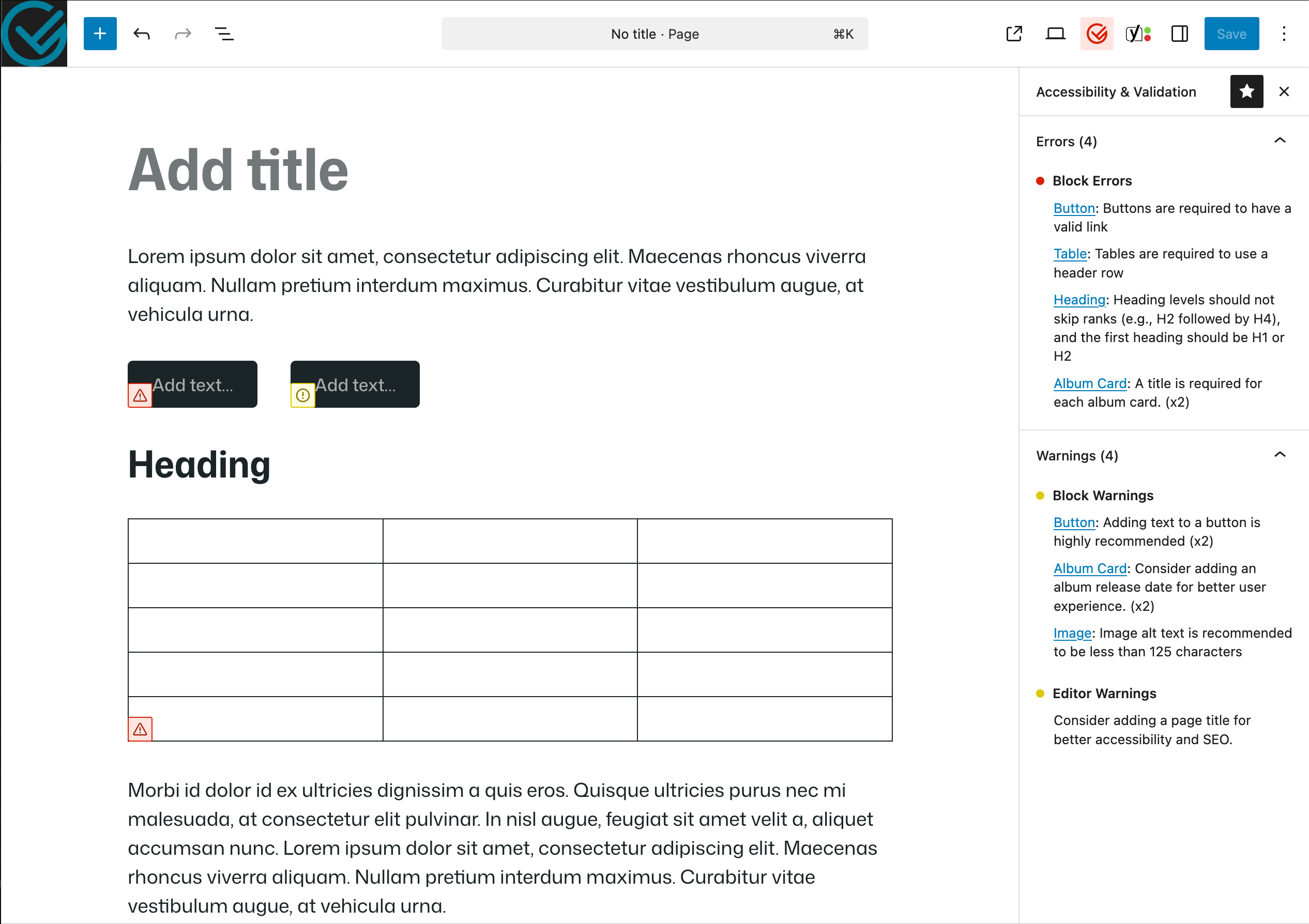
Validation Sidebar – A custom sidebar displays error and warning messages that link to blocks in the content area 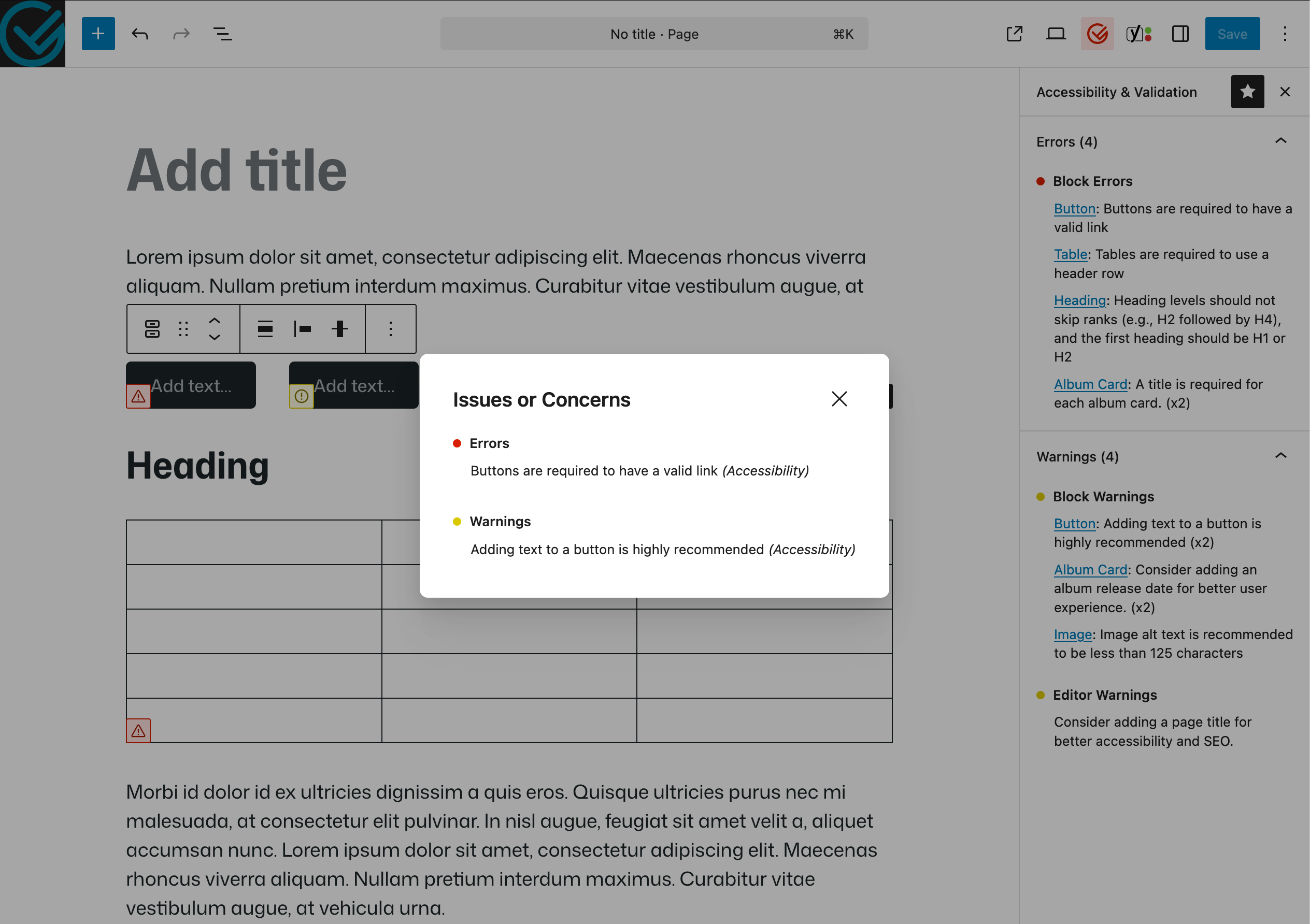
Validation Popover – Blocks with issues have an inline indicator that trigger an information popover on click 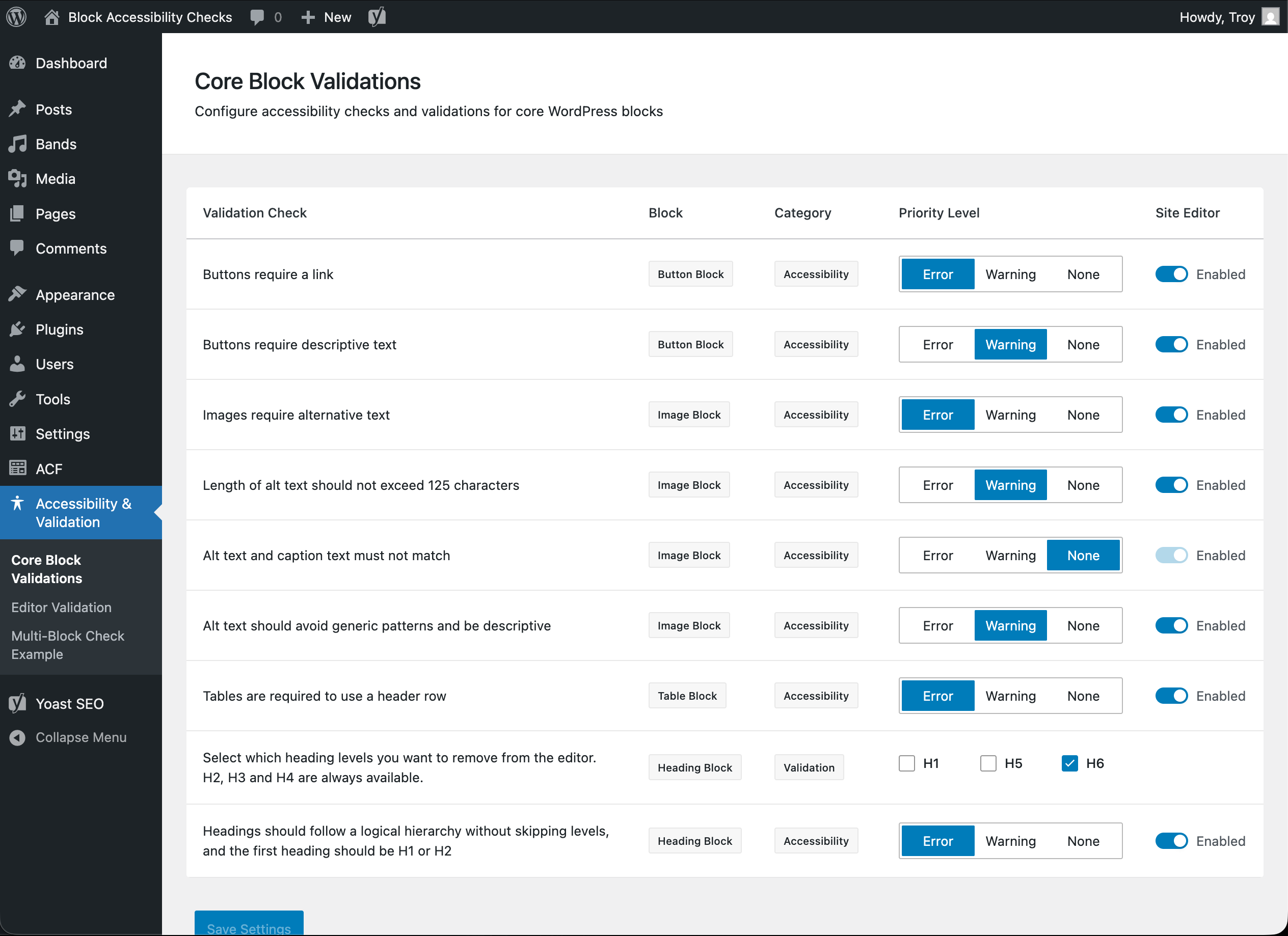
Comprehensive Settings Panel – Plugin configuration page with granular control over accessibility check severity levels 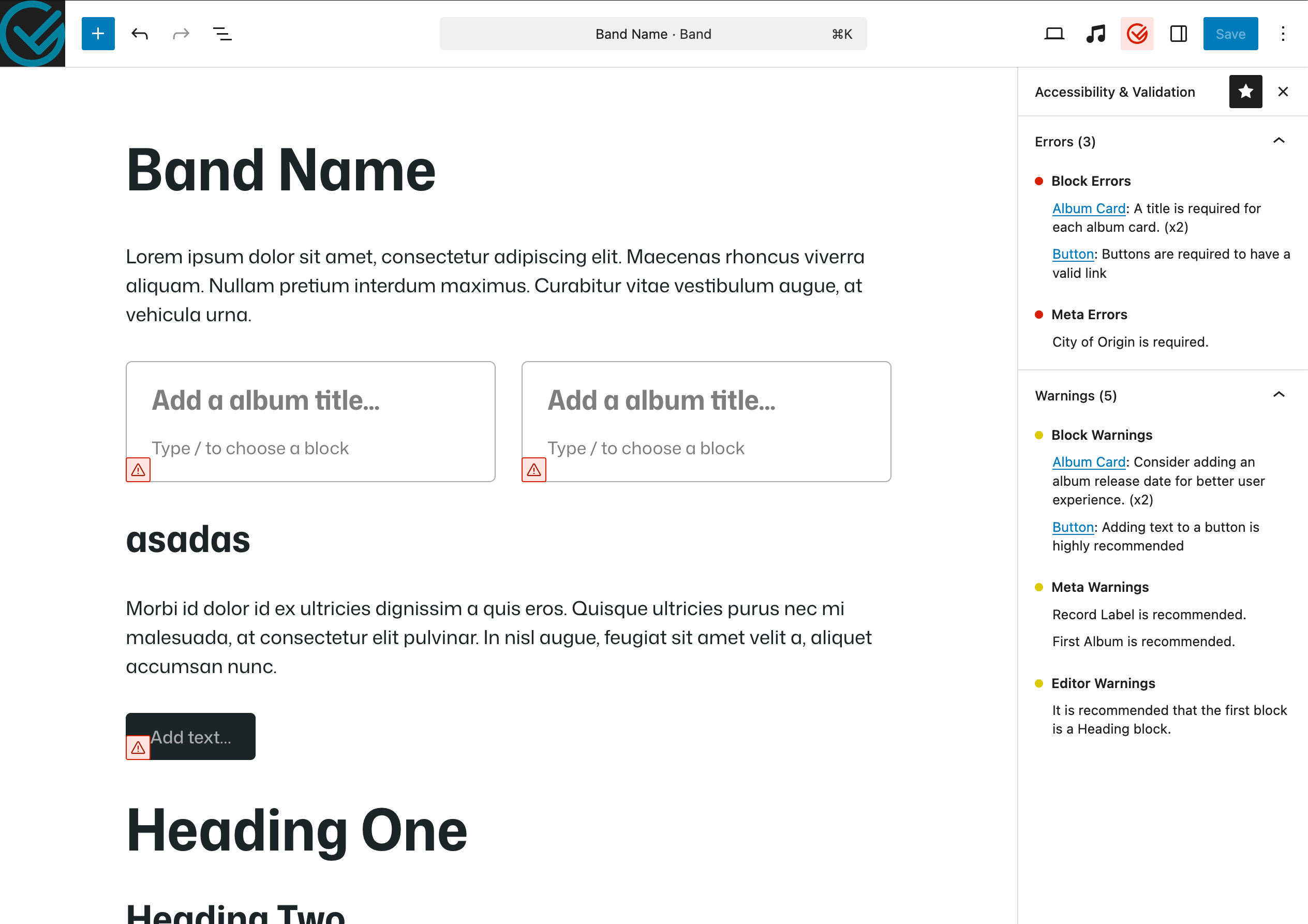
External Plugin Validation — An external plugin with a Band custom post type, card block and post meta that leverage the Validation API 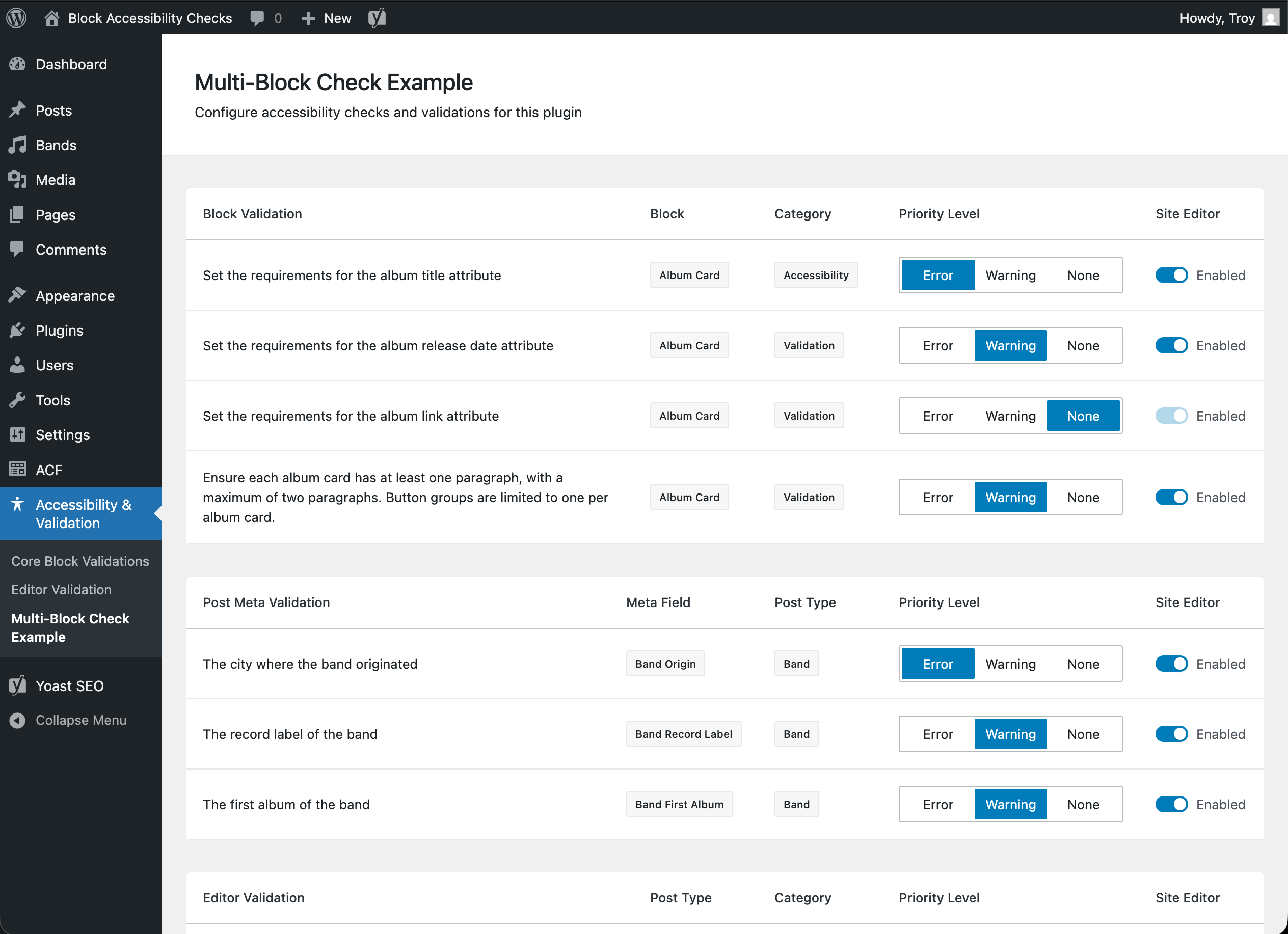
External Plugin Settings Panel — An external plugin integrated into the settings page grouped by block, post meta and editor validation options


Installatie
From WordPress Admin:
1. Go to Plugins Add New in your WordPress admin
2. Search for “Block Accessibility Checks”
3. Click “Install Now” and then “Activate”
4. Navigate to Block Checks Core Block Checks to configure your preferences
Manual Installation:
1. Download the plugin files and upload to /wp-content/plugins/block-accessibility-checks/
2. Activate the plugin through the Plugins menu in WordPress
3. Configure your accessibility check preferences in the settings
After Installation:
The plugin works immediately after activation with sensible defaults. You can customize settings at:
- Block Checks Core Block Validations – Configure core WordPress block validation
- Block Checks Editor Validation – Configure post/page title validation
- Block Checks Meta Field Checks – Configure post meta field validation (if any registered)
- Block Checks Site Editor Checks – Configure validation for site editor (templates/template parts)
- Block Checks [External Plugin Name] – Configure validation for external plugin blocks (automatically created)
FAQ
How do I use this plugin?
- Once activated, navigate to Block Checks Core Block Checks to configure your preferences
- Choose which checks should be errors (prevent publishing), warnings (allow publishing with notice), or disabled
- Start editing content in the Gutenberg editor – accessibility checks run automatically across blocks, meta fields, and document structure
- Blocks with issues will show red borders (errors) or yellow borders (warnings) with detailed messages in the block inspector panel
- Fix the highlighted issues or adjust check severity levels as needed
What happens when accessibility issues are found?
The plugin provides immediate visual feedback through its three-tier validation system:
* Red borders and icons around blocks with critical accessibility errors
* Yellow borders and icons around blocks with warnings
* Detailed error messages in the block inspector sidebar panel, grouped by severity and category
* Publishing prevention for critical errors in blocks, meta fields, or editor-level checks (configurable)
* Warning indicators for less critical issues that still allow publishing with user awareness
* Post locking when required meta fields fail validationCan I add custom accessibility checks for my own blocks?
Yes! The plugin includes a comprehensive developer API with extensive hooks and filters. You can register custom accessibility checks for:
- Block validation – Any block type using the
ba11yc_register_checksaction - Meta field validation – Post meta fields using the
ba11yc_register_meta_checksaction - Editor-level validation – Document-wide checks using the
ba11yc_register_editor_checksaction
See the developer documentation for complete examples and quick start guides.
- Block validation – Any block type using the
Does this work with blocks from other plugins?
Absolutely! The plugin’s architecture supports any WordPress block, whether from core, themes, or third-party plugins. External plugins automatically get their own settings page under the Block Checks menu, allowing administrators to configure validation levels for each check independently.
Can I configure which checks are errors vs warnings?
Yes, all checks can be configured as errors (prevent publishing), warnings (allow publishing with notice), or disabled entirely. Visit Block Checks in your WordPress admin to access:
- Core block check settings
- Meta field check settings
- Site editor check settings
- External plugin check settings (automatically created)
Can I validate required post meta fields?
Yes! The plugin includes a comprehensive meta field validation system. Register required meta fields using the
ba11yc_register_meta_checksaction hook, implement JavaScript validation using theba11yc_validate_metafilter, and the plugin will automatically lock post saving when validation fails, provide visual feedback, and integrate seamlessly with block validation.Does this work in the site editor?
Yes! The plugin works in both the post editor and site editor. The site editor has separate configurable settings accessible at Block Checks Site Editor Checks, allowing you to configure different validation rules for template/template part editing versus post-level content.
Will this slow down my editor?
No, the plugin is optimized for performance with smart caching and efficient validation algorithms. All validation runs in JavaScript for real-time feedback without server round-trips. Checks run in real-time without impacting editor responsiveness.
How to uninstall the plugin?
Simply deactivate and delete the plugin through the WordPress admin interface.
Beoordelingen
Er zijn geen beoordelingen voor deze plugin.
Bijdragers & ontwikkelaars
“Block Accessibility Checks” is open source software. De volgende personen hebben bijgedragen aan deze plugin.
Bijdragers

“Block Accessibility Checks” is vertaald in 1 locale. Dank voor de vertalers voor hun bijdragen.
Vertaal “Block Accessibility Checks” in je eigen taal.
Interesse in ontwikkeling?
Bekijk de code, haal de SVN repository op, of abonneer je op het ontwikkellog via RSS.
Changelog
View the changelog on the plugin website.

