

Beschrijving

Better Font Awesome
Beschrijving
Do you find this plugin helpful? Please consider leaving a 5-star review.
Better Font Awesome allows you to automatically integrate the latest available version of Font Awesome into your WordPress project, along with accompanying CSS, shortcodes, and TinyMCE icon shortcode generator.
Functies
Always up-to-date – automatically fetches the most recent available version of Font Awesome, meaning you no longer need to manually update the version included in your theme/plugin.
Backwards compatible – shortcode output is automatically updated depending on which version of Font Awesome you choose, meaning that you can switch versions without having to modify your shortcodes.
Compatible with other plugins – designed to work with shortcodes generated with plugins like Font Awesome Icons, Font Awesome More Icons, and Font Awesome Shortcodes, so you can switch to Better Font Awesome and your existing shortcodes will still work.
CDN speeds – Font Awesome CSS is pulled from the super-fast and reliable jsDelivr CDN.
Shortcode generator – includes an easy-to-use TinyMCE dropdown shortcode generator.
Instellingen
All settings can be adjusted via Settings → Better Font Awesome.
Gebruik
Better Font Awesome can be used in 3 different ways: shortcode, HTML, and TinyMCE
1. shortcode
[icon name="flag" class="2x spin border" unprefixed_class="my-custom-class"] Note that prefixes (fa- and icon-) are not required, but if you do include them things will still work just fine! Better Font Awesome is smart enough to know what version of Font Awesome you’re using and correct of the appropriate prefix.
That means that all of the following shortcodes will work, regardless of what version of Font Awesome you choose:
[icon name=”flag” class=”2x spin border”]
[icon name=”icon-flag” class=”icon-2x icon-spin icon-border”]
[icon name=”fa-flag” class=”fa-2x fa-spin fa-border”]
[icon name=”icon-flag” class=”fa-2x spin icon-border”]
You can read more about shortcode usage on Github
2. TinyMCE
Better Font Awesome also provides you with an easy-to-use drop down menu when editing in TinyMCE’s visual mode. Check out our Screenshots to see what it looks like.
3. HTML
Note that prefixes are required for HTML usage, and are version-specific. For this reason, shortcode usage is encouraged over HTML. If you do want to use HTML, however, you can read more on the Font Awesome site.
Geavanceerd / integratie
Better Font Awesome is built around the Better Font Awesome Library. This library allows you to integrate Better Font Awesome into any custom project you want to create (perhaps a theme or plugin with a constantly up-to-date icon list), and includes all the filters you might need.
Talen / vertalingen
- Engels
- French (thanks to David Tisserand)
Credits
Many thanks to the following plugins and their authors:
- Font Awesome Icons by Rachel Baker
- Font Awesome More Icons by Web Guys
- Font Awesome Shortcodes by FoolsRun
- Dmitriy Akulov and the awesome folks at jsDelivr
And many thanks to the following folks who helped with testing and QA:
Schermafbeeldingen
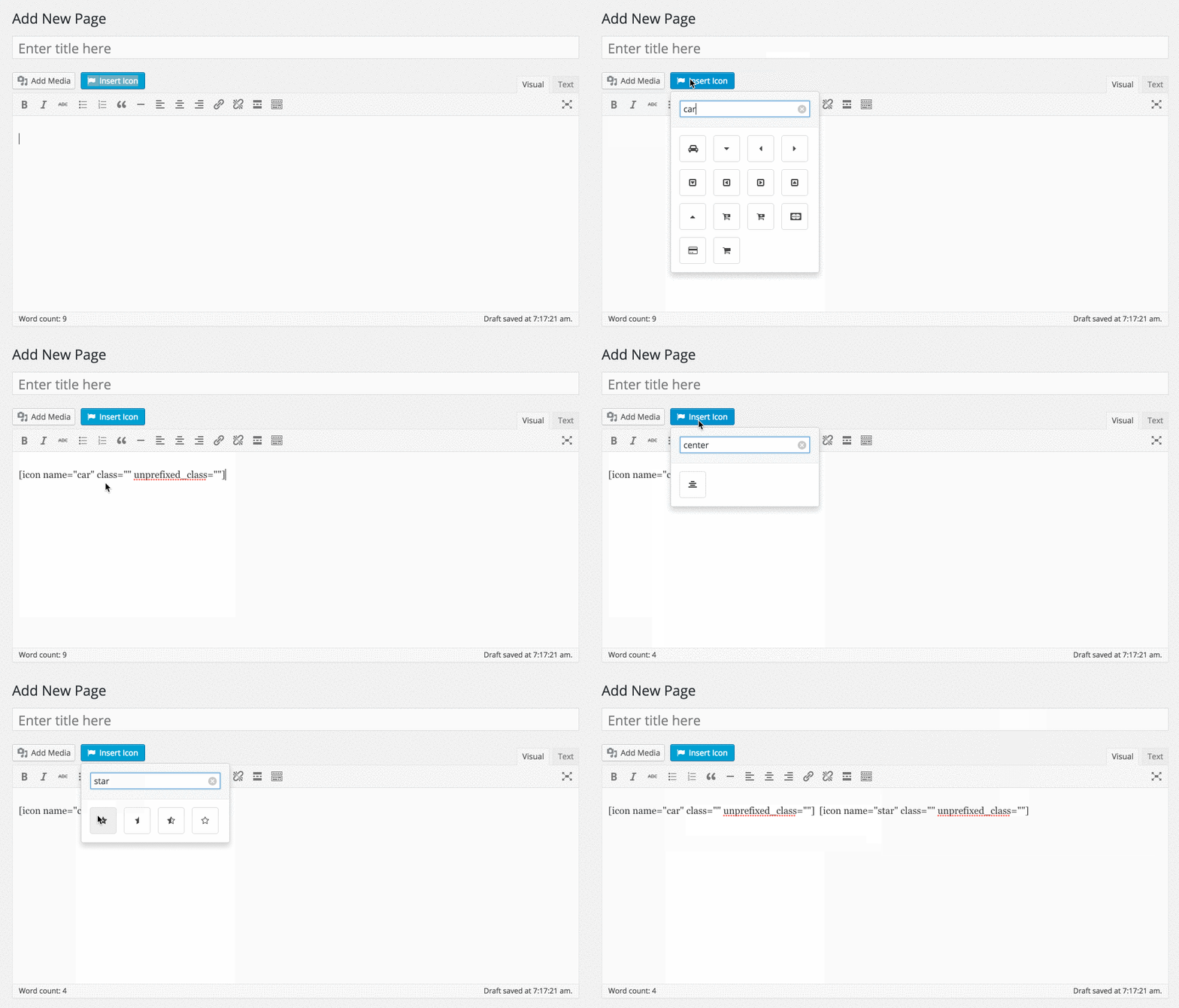
De pictogram shortcode dropdown selector 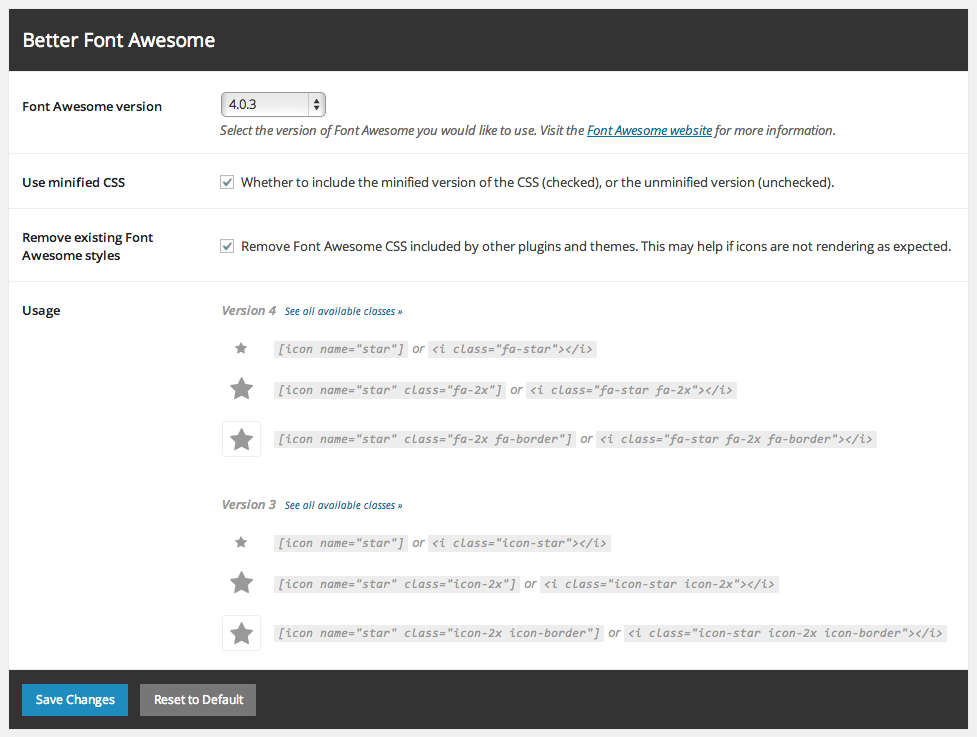
Better Font Awesome settings, accessed via Instellingen → Better Font Awesome


Installatie
This section describes how to install the plugin and get it working.
- Upload Better Font Awesome to the /wp-content/plugins/ directory.
- De plugin activeren via het ‘Plugin’ menu in WordPress.
- That’s it! Now you can use 3 different methods (shortcode, HTML, TinyMCE) to insert Font Awesome icons, all outlined in the Description section.
FAQ
How is this plugin different from other Font Awesome plugins?
This plugin is unique in that it automatically pulls in all available versions of Font Awesome, meaning you never have to wait for the plugin developer to add the latest version. Furthermore, Better Font Awesome is designed to work with a wide variety of shortcode formats used by other Font Awesome plugins – this means that you can easily switch to Better Font Awesome (if, for example, you need to include icons from the most recent version of Font Awesome, which isn’t always available with other plugins), and they will still work.
Moet ik lettertypebestanden installeren?
Nope. Better Font Awesome automatically pulls in everything you need, and it does it from the lightning-fast jsDelivr CDN.
What happens if I have another plugin/theme that uses Font Awesome?
Better Font Awesome does it’s best to load after any existing Font Awesome CSS, which can minimize conflicts. If you are experiencing any unexpected behavior resulting from plugin/theme conflicts, you can try checking the box to “Remove existing Font Awesome styles” in under Settings → Better Font Awesome.
Beoordelingen


Bijdragers & ontwikkelaars
“Better Font Awesome” is open source software. De volgende personen hebben bijgedragen aan deze plugin.
Bijdragers


“Better Font Awesome” is vertaald in 18 localen. Dank voor de vertalers voor hun bijdragen.
Vertaal “Better Font Awesome” in je eigen taal.
Interesse in ontwikkeling?
Bekijk de code, haal de SVN repository op, of abonneer je op het ontwikkellog via RSS.
Changelog
2.0.4
- Bump BFAL om attributen goed te escorteren
- Eenheidstests toevoegen
2.0.3
- Bugfix: fix broken icon text selection
- Improve admin settings success/error message logic
2.0.2
- Bugoplossing: oplossing CSRF kwetsbaarheid
2.0.1
- Bugfix: add necessary @font-face mappings to ensure site-specific CSS and pseudo-elements render correctly
2.0.0
- Ondersteuning toevoegen voor Font Awesome v5
- Integration with Font Awesome GraphQL API for all data fetching (improve performance)
- Integreren met Font Awesome CDN voor alle CSS
- Add option to include the v4 Font Awesome CSS shim to support older icons (default on for upgrades)
- Updatee hard-coded fallback Font Awesome version
- Modify version check frequency to a saner 24 hour interval
- Zorg ervoor dat beheer berichten af te wijzen zijn
- Lower data fetch timeout to mitigate performance risks
- Remove legacy options that are no longer relevant (version select, minification opt-out)
- Add more/better unit tests to ensure things are working as expected
1.7.6
- Opgelost: terugdraaien naar 1.7.4 codebase.
- Fix: remove calls to
ready()jQuery method to support latest jQuery versions.
1.7.5
(BAD BUILD)
* Fix: remove calls to ready() jQuery method to support latest jQuery versions.
* Fix: update fontawesome-iconpicker dependency to repair broken icon select functionality.
1.7.4
- Fix: revert accidental bump to underlying Better Font Awesome Library dependency.
1.7.3
- Add admin notice to invite beta testers.
1.7.2
- Verhoog de “getest tot en met” waarde naar 5.5.
1.7.1
- Fix functionality to hide/show admin notices.
1.7.0
- Update fallback Font Awesome to v4.7.0.
- Switch from using git submodules to composer dependency management for core library inclusion.

