

Beschrijving

Autocomplete Search
Beschrijving
The Autocomplete Search Plugin enhances your WordPress search experience by providing an intuitive, fast, and responsive autocomplete feature. It searches across:
– Posts
– Pages
– WooCommerce Products
– Custom Posts
Features
- Real-time Autocomplete Search
- Supports Multiple Post Types
- Enable search onlu for specific post type or only for products
- AJAX-Powered Search
- Customizable Search Box
- Shortcode Implementation
- User-friendly and Accessible
- Custom Post Type Support
Developers
The plugin provides filters to allow theme and plugin developers to customize output:
atcl_autocomplete_search_placeholder– Filter the search input placeholder text.atcl_autocomplete_search_wrapper_class– Filter the wrapper CSS classes.atcl_autocomplete_search_input_class– Filter the input field CSS classes.
Shortcode attributes:
* class – Add a custom CSS class to the search wrapper.
Example:
[atcl_autocomplete_search class=”header-search”]
Schermafbeeldingen
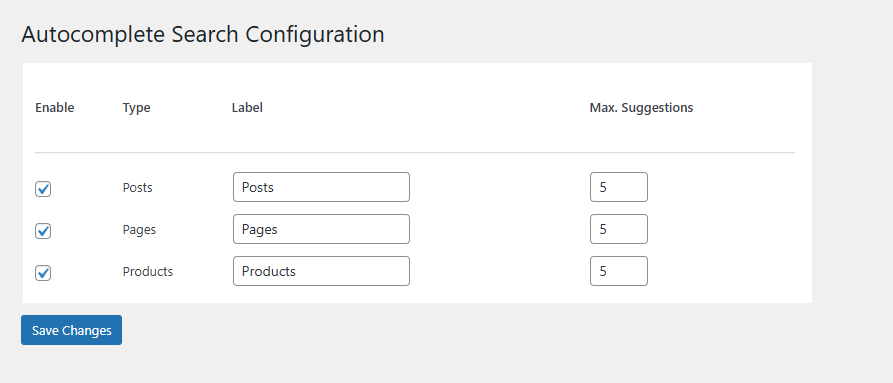
/assets/Screenshot-1.png 
/assets/Screenshot-2.png 
/assets/Screenshot-3.png


Installatie
Download the Plugin
Download the plugin zip file from the WordPress Plugin Repository or your provided source.Upload the Plugin
- Go to your WordPress Admin Dashboard.
- Navigate to Plugins > Add New.
- Click the Upload Plugin button at the top of the screen.
- Select the downloaded .zip file and click Install Now.
Activate the Plugin
Once the installation is complete, click Activate Plugin to enable the autocomplete search functionality.Add the Search Box
Use the [atcl_autocomplete_search] shortcode to display the search box on any post, page, or widget area.
You can also pass a custom CSS class to style the search box differently in your theme:
[atcl_autocomplete_search class=”header-search”]
This allows full control over the appearance using your theme’s CSS.
FAQ
A question that someone might have
Yes, the plugin fully supports WooCommerce and can search products, including their titles, and price.
Can I limit the search to specific post types?
Absolutely! You can Enable the post types to search by using the backend setting
Is this plugin compatible with all themes?
Yes, the plugin is designed to work with most WordPress themes. If you encounter style conflicts, you can adjust them with custom CSS.
Does the plugin work on mobile devices?
Yes, the autocomplete feature is fully responsive and works seamlessly on all devices, including desktops, tablets, and smartphones.
Can I add the search box to a widget area?
Yes! Simply use the [atcl_autocomplete_search] shortcode in a text widget.
How do I style the search box?
You can style the search box using your theme’s custom CSS or by adding your custom styles to the site’s stylesheet.
Is the plugin compatible with multilingual sites?
Yes, the plugin is compatible with multilingual sites and can work alongside popular translation plugins like Polylang and WPML.
Can I display search results on a custom page?
At this time, the plugin only provides autocomplete suggestions in the dropdown. However, you can customize your search experience using additional hooks or filters.
Beoordelingen

Bijdragers & ontwikkelaars
“Autocomplete Search” is open source software. De volgende personen hebben bijgedragen aan deze plugin.
Bijdragers
Vertaal “Autocomplete Search” in je eigen taal.
Interesse in ontwikkeling?
Bekijk de code, haal de SVN repository op, of abonneer je op het ontwikkellog via RSS.
Changelog
1.0.0
- Initial release.
- AJAX-powered autocomplete search for posts, pages, WooCommerce products and custom posts
- Shortcode support for easy implementation: [atcl_autocomplete_search].
- Support for multiple post types, including custom post types.
- Fully responsive and works across all devices.
- WooCommerce integration for product search.
- Lightweight and optimized for fast performance.
- Currently supports English language only.
1.1.0
- Added multilingual compatibility (tested with Polylang and WPML).
- Enhanced shortcode output with better markup and accessibility improvements.
- Improved AJAX search performance and response time.
- Added text domain for full translation support.
- Fixed “Updating failed. The response is not a valid JSON response” issue in block editor.
- Updated settings page UI for better usability.
- Minor bug fixes and code optimizations.
1.2.0
- Added theme-level control for search box styling via filters and CSS classes.
- Added filter to customize the search input placeholder text.
- Added support for custom wrapper and input field CSS classes.
- Added shortcode attribute to allow custom CSS classes per search instance.
- Minor code refactoring and performance optimizations.

