

Beschrijving


Autocomplete for WooCommerce Orders
Beschrijving
Tired of manually marking WooCommerce orders as “Completed”?
Autocomplete for WooCommerce Orders automatically completes orders after successful payment based on product type, payment method, customer role, and global rules — no coding required.
This plugin works perfectly for physical, digital, virtual, and downloadable products, helping store owners save time and automate order processing.
Why Store Owners Choose Autocomplete for WooCommerce Orders
- Automatically complete WooCommerce orders after payment
- Smart conditions based on payment gateway, product type, and user role
- Improve customer experience with instant order completion
- Compatible with PayPal, Stripe, Apple Pay, Google Pay, Klarna, and more
- Cash on Delivery and Bank Transfer excluded by default for safety
- Optimized for large stores processing 20,000–30,000+ orders
- Lightweight and performance-friendly
Ideal for:
- Digital product stores (eBooks, music, PDFs)
- Membership sites, LMS platforms, and subscriptions
- Stores looking to automate WooCommerce order workflows
- High-volume WooCommerce businesses
Free Features
Automation & Rules
- Automatically complete orders after successful payment
- Rules based on payment method and admin & customer role
- Global enable / disable option
Product Type Compatibility
- Simple products
- Virtual products
- Downloadable products
- Virtual & Downloadable products
Order Status & Display
- Display payment method on the order page
- Custom thank-you message on checkout success page
Performance & Compatibility
- Optimized for large WooCommerce stores
- Compatible with all major payment gateways
- Safe to use on live production websites
Premium Features (PRO)
Unlock PRO for advanced WooCommerce automation.
Advanced Automation Rules
- All Free features included
- Product-specific auto-complete rules
- Variable-product–only targeting
- Allow zero-value (₹0 / $0) orders to be auto-completed
- User role–based auto-complete settings
Targeting & Control
- Product picker for selective automation
- Category-based order completion rules
Insights & Analytics
- Advanced auto-complete order analytics
Notifications & Emails
- Custom admin and customer email notifications
Import / Export & Portability
- Import and export auto-completed order rules
- Import and export plugin settings for use on another site
Upgrade to PRO – Coming soon
Notes
Supported payment gateways include PayPal, Stripe, Apple Pay, Google Pay, Square, Amazon Pay, Klarna, Afterpay, and Venmo.
Cash on Delivery, Bank Transfer, and Check payments are not supported by default and require manual order review.
Summary
WooCommerce Auto Complete Orders is a simple and powerful solution to automate WooCommerce order completion.
Save time, reduce manual work, and streamline your store’s order workflow — even for high-volume shops processing 20,000+ orders.
Schermafbeeldingen
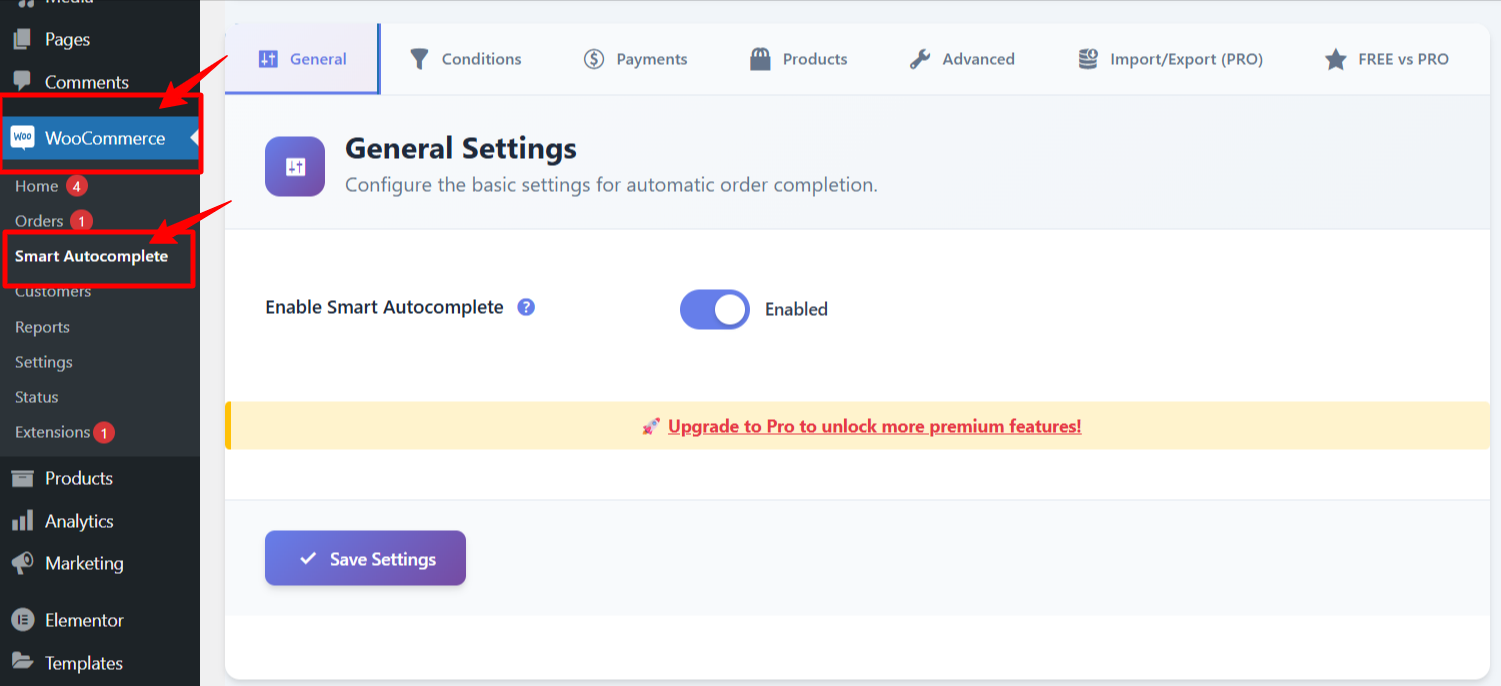
Autocomplete settings inside WooCommerce with plugin enable/disable options. 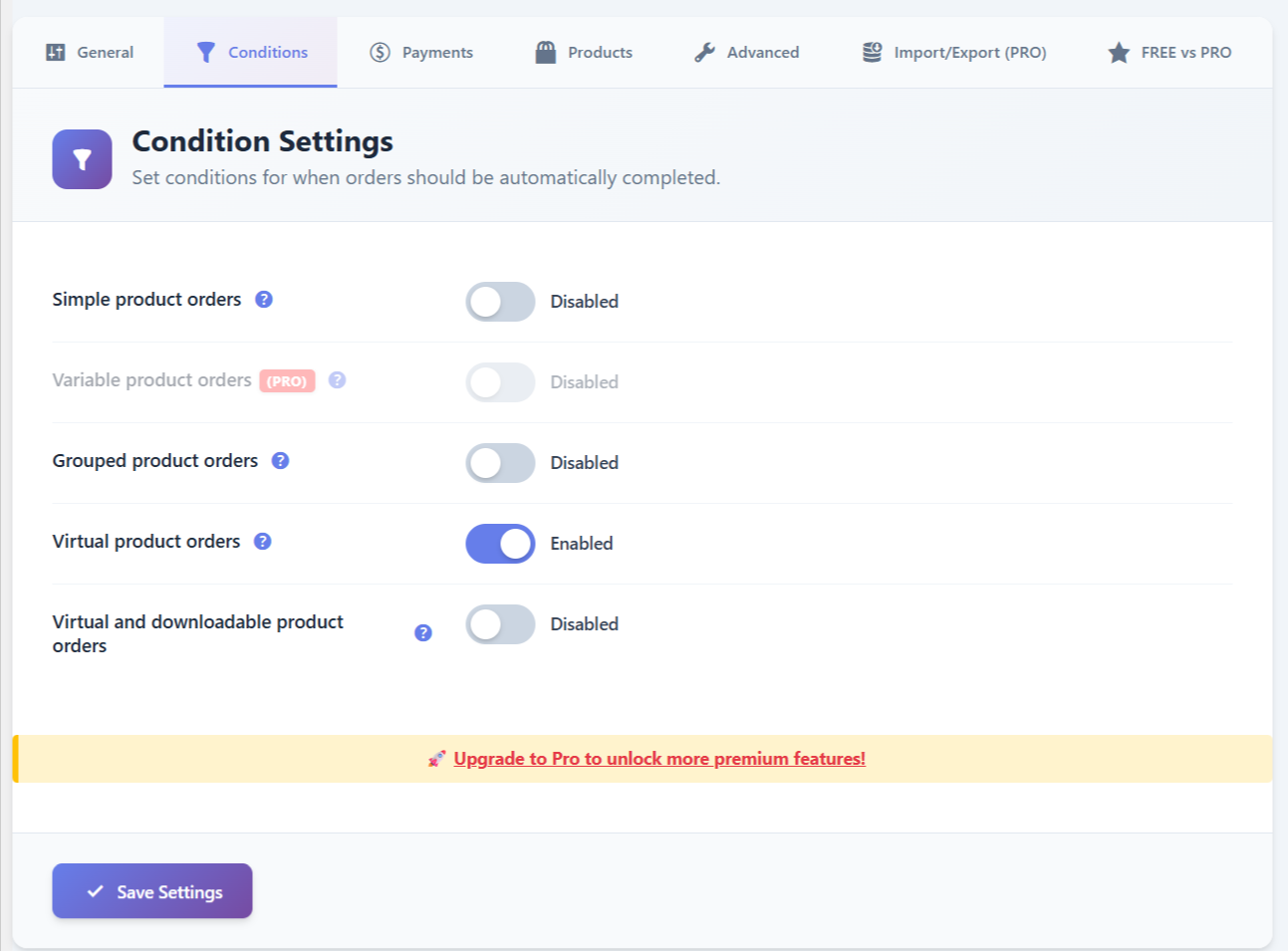
Product rules configuration for Simple, Variable, Virtual, and Virtual + Downloadable products. 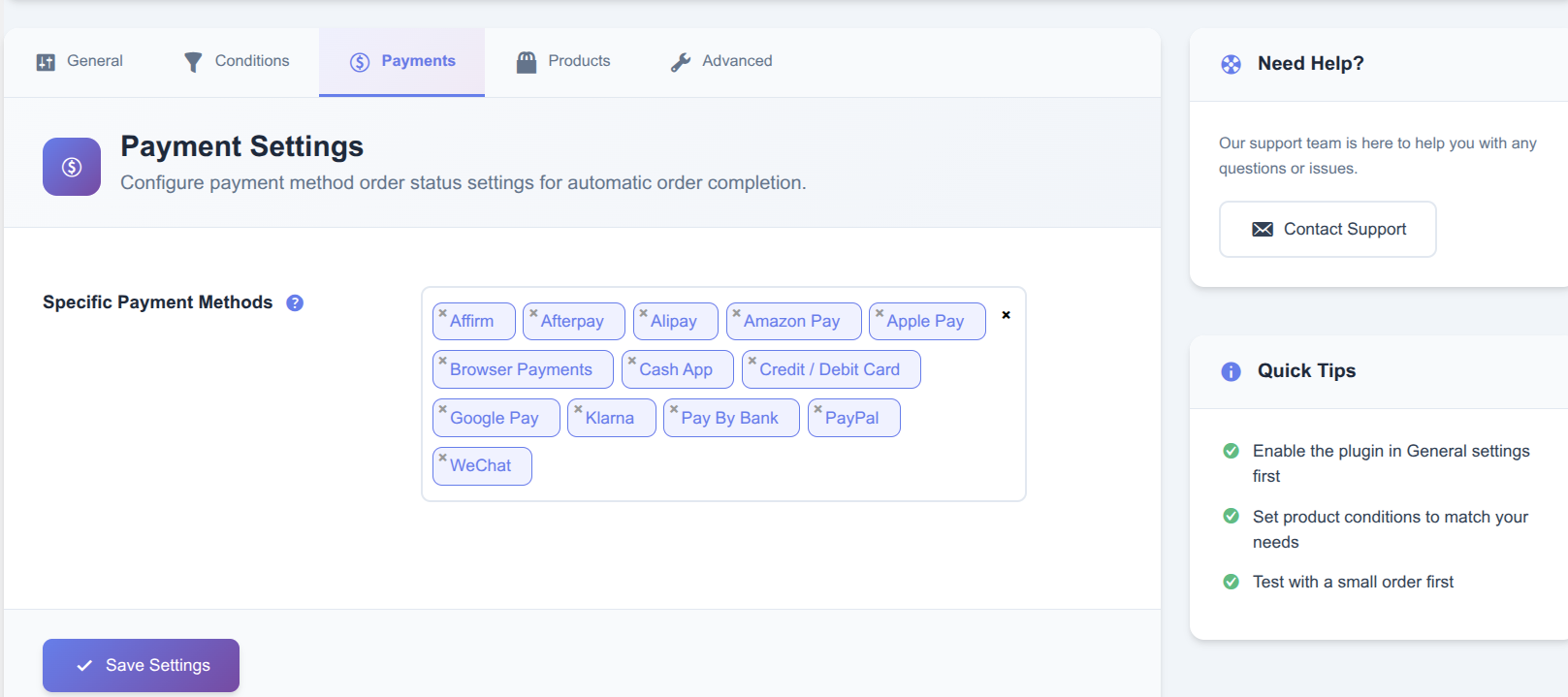
Payment method conditions — select gateways such as PayPal, Stripe, Venmo, SagePay, Apple Pay, and more. 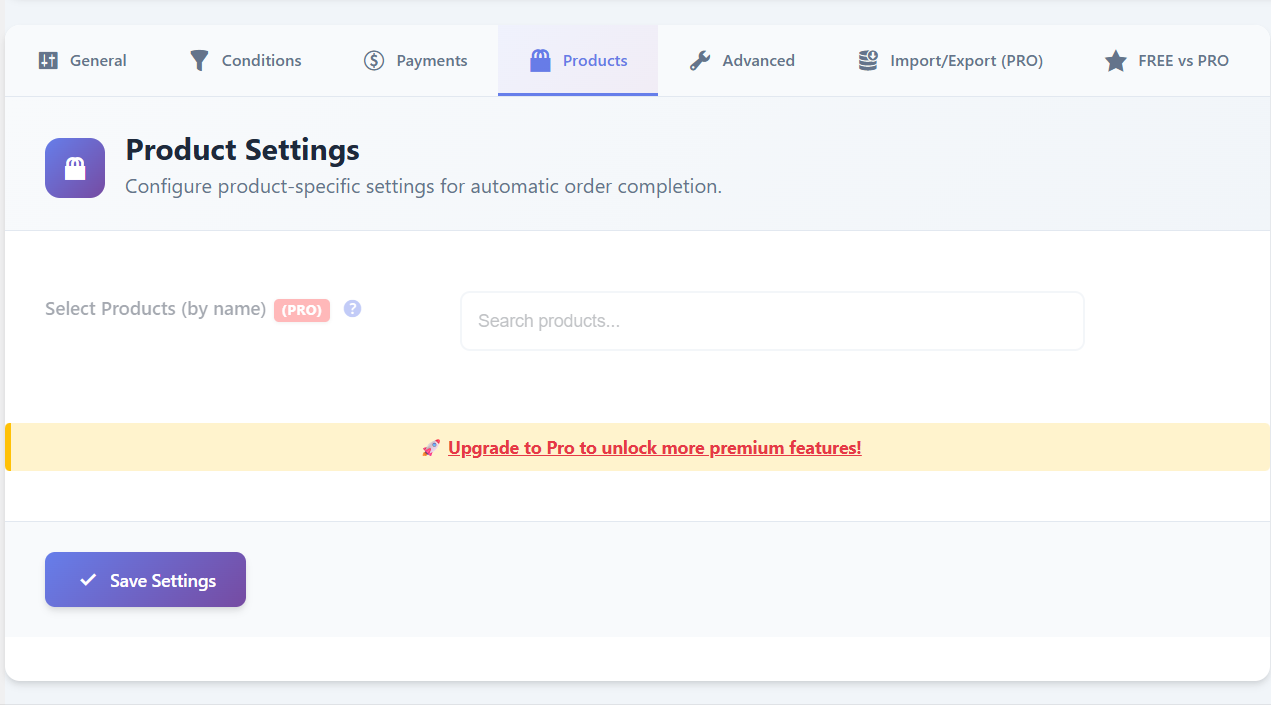
Product picker — apply autocomplete rules to specific products. 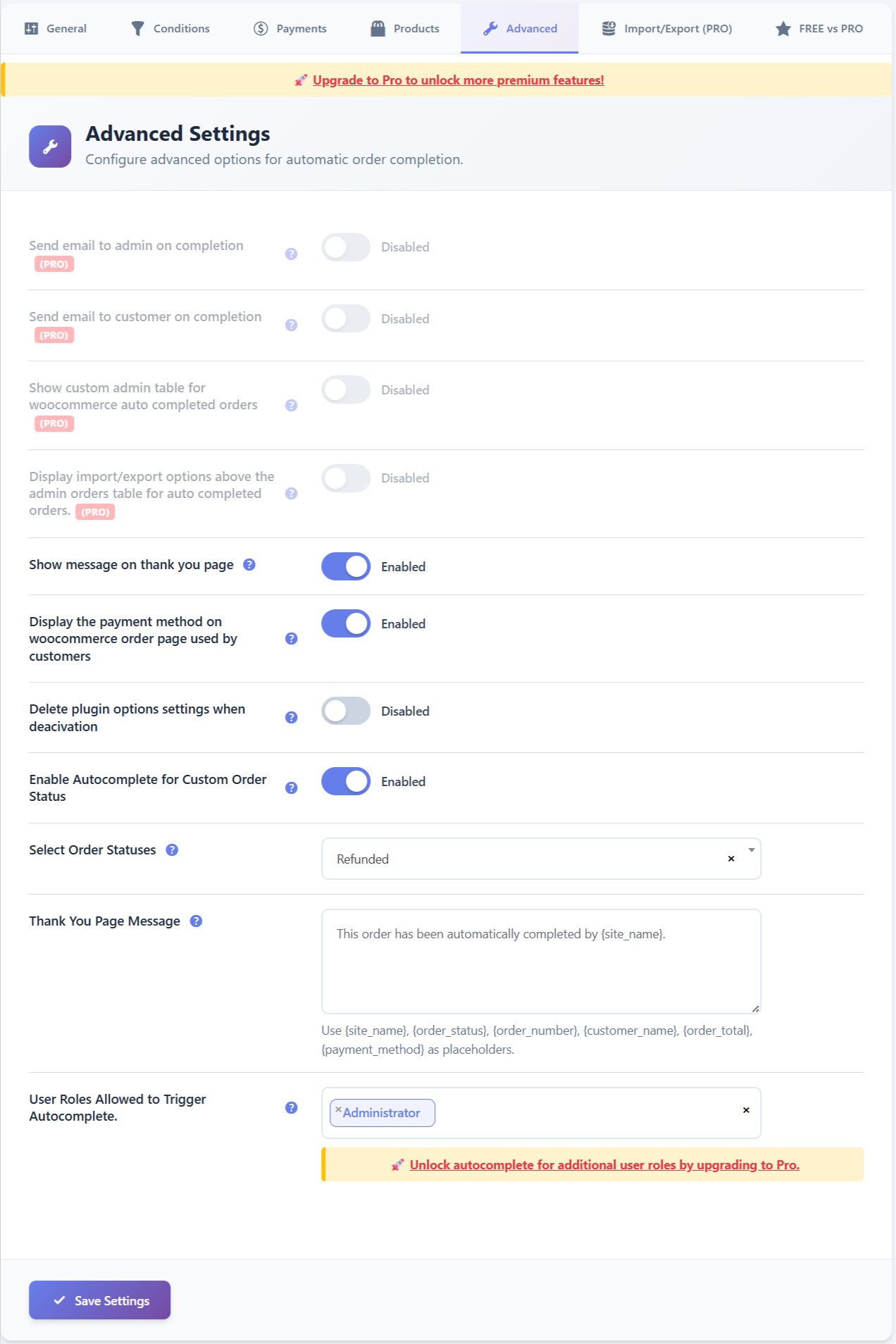
Advanced settings — autocomplete order emails, role-based conditions, and more. 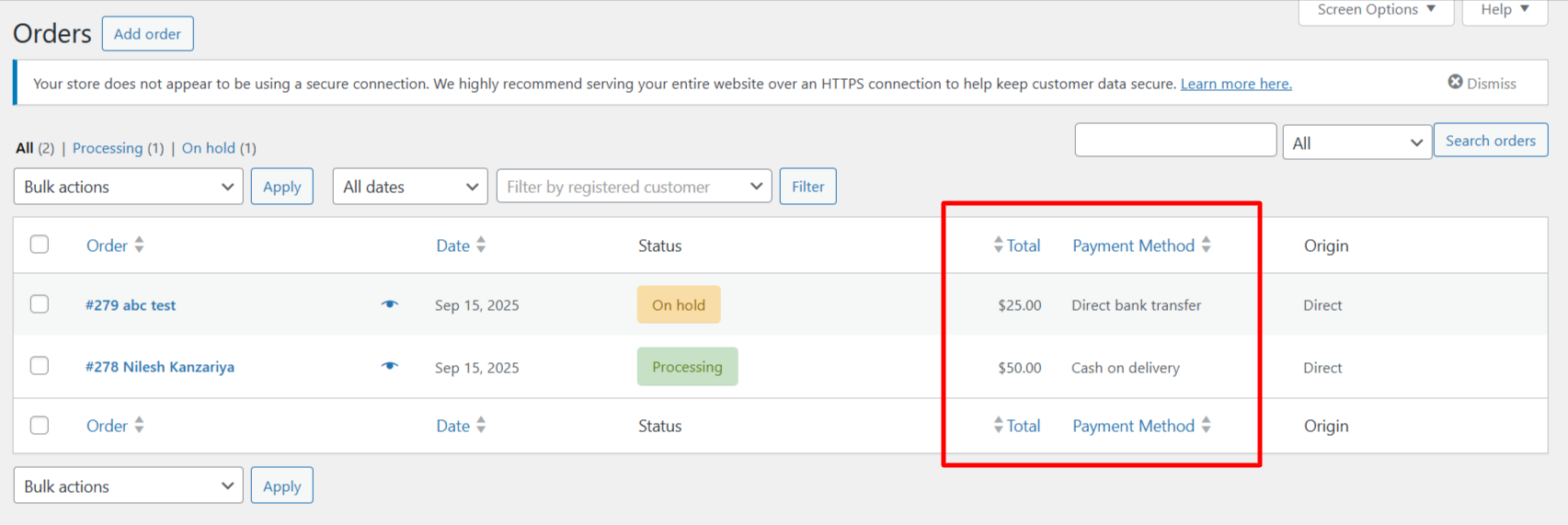
Display the payment method used by customers on the WooCommerce order details page. 
Custom Thank You page displayed after the order is automatically completed. 
Orders automatically marked as “Completed” in the WooCommerce orders list.


Installatie
- Upload the plugin to
/wp-content/plugins/autocomplete-for-woo-orders/ - Activate the plugin through the Plugins menu in WordPress
- Go to WooCommerce Smart Autocomplete
- Enable your automation rules
- Orders will now complete automatically after payment
Use Cases
Digital Product Stores (eBooks, PDFs, Music, Software): Instantly complete orders after payment so customers get immediate access to downloads without manual intervention.
Online Courses & LMS Platforms: Automatically mark orders as completed to trigger course enrollment, lesson access, or student dashboards right after checkout.
Membership & Subscription Websites: Enable seamless access to premium content by auto-completing paid orders for members and subscribers.
High-Volume WooCommerce Stores: Save hours of admin time by auto-completing thousands of paid orders daily—ideal for stores processing 20,000+ orders.
Virtual Service Providers: Auto-complete orders for consultations, digital services, or online bookings where shipping is not required.
Event Tickets & Webinar Sales: Instantly confirm attendance and send access details after successful payment without manual order handling.
Print-on-Demand & Dropshipping Stores: Auto-complete prepaid orders to streamline fulfillment workflows and reduce order processing delays.
Multi-Gateway Payment Stores: Apply smart rules based on payment methods (PayPal, Stripe, Apple Pay, Google Pay, Klarna, etc.) for safer automation.
Hybrid Stores (Physical + Digital Products): Automatically complete digital-only orders while keeping physical product orders under manual review.
Supported product types
– Types: Simple, Simple Virtual, Simple Virtual & Downloadable
– Optional (Pro): Variable, Variable Virtual, Variable Virtual & Downloadable
Optimized for large stores
Handle up to 50k+ order autocomplete for virtual products
Works with most popular WordPress themes
User Feedback
❛❛-Lightweight, reliable, and super easy to set up, this plugin saves me hours by instantly completing WooCommerce orders after payment. Perfect for digital products and a much better alternative to the heavier plugins out there.-❜❜
-patricknehme
❛❛-Before using this plugin, we had to manually mark dozens of small orders as complete every day. Now everything runs automatically, and our customers get instant confirmations. It’s simple, reliable, and works right out of the box.❜❜
-amangupta
Like that plugin? Hate it? Want a new feature? Send your feedback
Check out our other WordPress Plugins-
H-Shipping Multiple Shipping Addresses for WooCommerce – Solves the problem of customers needing to repeatedly type different shipping addresses for their orders.
FAQ
Does this plugin automatically complete WooCommerce orders?
Yes. Orders are automatically marked as Completed after successful payment, based on your configured rules.
Which product types are supported?
Simple, Variable, Virtual, Downloadable, and Virtual + Downloadable products are supported.
Does it work with physical products?
Yes. Physical products can be auto-completed if payment is successful, depending on your store workflow.
Does it work with Cash on Delivery or Bank Transfer?
No. Cash on Delivery, Bank Transfer, and Check payments are excluded by default for safety reasons.
Which payment gateways are supported?
All gateways that mark orders as paid, including PayPal, Stripe, Apple Pay, Google Pay, Amazon Pay, Klarna, Afterpay, Venmo, and more.
Will WooCommerce emails still be sent?
Yes. All default WooCommerce emails continue to work normally.
How can I reach you, if I need any modification, customization or helps?
Beoordelingen


Bijdragers & ontwikkelaars
“Autocomplete for WooCommerce Orders” is open source software. De volgende personen hebben bijgedragen aan deze plugin.
Bijdragers

Vertaal “Autocomplete for WooCommerce Orders” in je eigen taal.
Interesse in ontwikkeling?
Bekijk de code, haal de SVN repository op, of abonneer je op het ontwikkellog via RSS.
Changelog
1.1.7
- Updated readme file.
- Fixed minor bugs
1.1.6
- Updated readme file.
- Fixed minor bugs
1.1.5
- WooCommerce compatibility
- Updated readme file.
- language pot file Updated.
- Fixed minor bugs
1.1.4
- WooCommerce compatibility
- Updated readme file.
- language pot file Updated.
- Fixed minor bugs
- Fixed mix product type issue for autocomplete order
1.1.3
- Updated readme file.
- language pot file Updated.
- New contributor added
1.1.2
- Updated readme file.
- language pot file Updated.
1.1.1
- Updated readme file.
- language pot file Updated.
- Minor bug fixes and performance improvements.
1.1.0
- WooCommerce compatibility.
- Updated readme file.
- language pot file Updated.
1.0.9
- WooCommerce compatibility.
- Updated compatibility with the latest WooCommerce version.
- Updated readme file.
- Minor bug fixes and performance improvements.
1.0.8
- Added support for custom order statuses.
- Updated compatibility with the latest WooCommerce version.
- Updated compatibility with the latest WordPress version.
- Minor bug fixes and performance improvements.
1.0.7
- Added custom order status support.
- Improved readme content for WordPress.org visibility.
- Tested with the latest WordPress and WooCommerce versions.
1.0.6
- Improved compatibility with recent WooCommerce updates.
- Enhanced clarity of settings descriptions.
1.0.5
- UI improvements and minor usability enhancements.
1.0.4
- Fixed default settings activation issue.
- Added premium feature highlights.
1.0.3
- Added documentation and help references.
1.0.2
- Readme formatting and clarity improvements.
1.0.1
- Minor fixes and translation readiness.
1.0.0
- Initial release.

