

Beschrijving

Deze plugin is niet getest met de laatste 3 grotere versies van WordPress. Mogelijk wordt het niet meer onderhouden of ondersteund. Ook kunnen er compatibiliteitsproblemen ontstaan wanneer het wordt gebruikt met recentere versies van WordPress.

Affiliate Notice Manager
Beschrijving
Most of the affiliate programs suggest marketers to add affiliate disclosure on their website. It’s always best practice, if you can add the Affiliate Notice or Disclosure below the post.
To promote products of UK, US or Canada based companies, you must need to add disclosure on your website. Large affiliate programs like Amazon, Ebay, Trip Advisor and others always suggest to follow FTC(Fedaral Trade Commission) guidelines.
Using this plugin you can easily add affiliate notice on posts. It’s easy and anyone can setup.
Features
Here are some features of this plugin:
- Show Affiliate Notice in Post
- Show Any Notice Below Post
- Display or Turn Off
Schermafbeeldingen
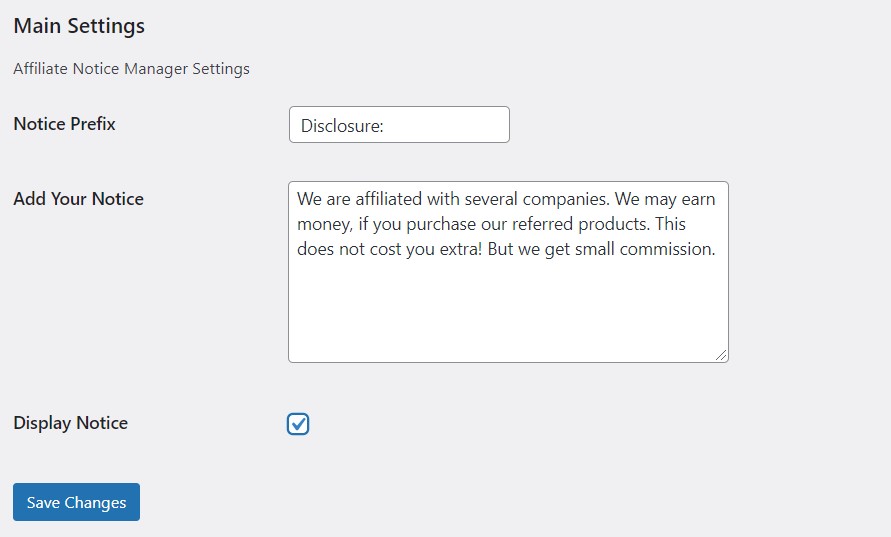
Installing the Plugins 
Admin Area View 
Frontend View


Installatie
To install and setup this plugin, follow below guide.
- Upload
affiliate-notice-manager.phpto the/wp-content/plugins/directory - Activate the plugin through the ‘Plugins’ menu in WordPress
- Visit the settings section of your plugins from the dashboard to setup Affiliate Disclosure.
FAQ
Do I Need Any Coding Knowledge?
You don’t need any coding or programming Knowledge to setup this plugin. Just follow setup guideline from above.
Affiliate Disclosure Will Display In Which Section?
Once you setup the plugin, the affiliate notice will be displayed in the single post section. In every single post, it will be displayed.

Bijdragers & ontwikkelaars
“Affiliate Notice Manager” is open source software. De volgende personen hebben bijgedragen aan deze plugin.
Bijdragers

“Affiliate Notice Manager” is vertaald in 1 locale. Dank voor de vertalers voor hun bijdragen.
Vertaal “Affiliate Notice Manager” in je eigen taal.
Interesse in ontwikkeling?
Bekijk de code, haal de SVN repository op, of abonneer je op het ontwikkellog via RSS.
Changelog
1.0.0
- Initial release.

